video box
Getting Started with NextBlock
Explore everything HomeAi has to offer with our step-by-step guide and video tutorial. Whether you're a first-time user or need a refresher, we’ll walk you through the key features and show you how to make the most of your experience.
Steps for How to Use HomeAi
1. Sign Up or Log In
- Create an account using your email, or log in if you’re already registered.
- Verify your email for a secure and personalized experience.
2. Set Your Preferences
- Enter your budget, preferred amenities, safety priorities, and other lifestyle preferences.
- Save your preferences for quick access in future searches.
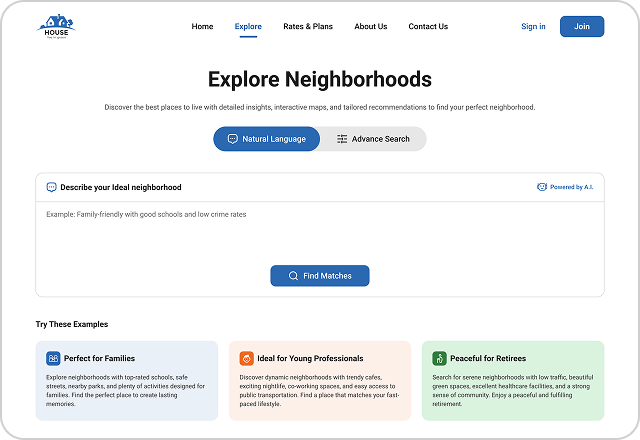
3. Start a Search
- Use the search bar to explore neighborhoods based on your saved preferences.
- Apply filters like proximity to schools, walkability, and property value ranges for refined results.
4. Explore the Results
- View neighborhoods in grid or map format.
- Compare different neighborhoods to find your perfect match.
5. Access Detailed Reports
- Click on any neighborhood to view in-depth data, including crime rates, school ratings, and more.
- Download reports or share them directly with others.
6. Save and Track Your Searches
- Save your favorite neighborhoods for easy tracking.
- Access them anytime from your user dashboard.
7. Get Support When Needed
- Use the built-in chat or support form for any questions or technical issues.
- Check out our FAQ section for quick answers.